

EkLine Docs Reviewer GitHub Actions integration
Prerequisites
Section titled “Prerequisites”Before you begin, confirm you have the following:
- EkLine Token: Get it from the Dashboard.
- Repo Secrets: Add your token as a repository secret (Settings > Secrets and variables > Actions).
Quick setup
Section titled “Quick setup”Create a workflow file at .github/workflows/ekline.yml.
Copy this configuration to run EkLine on every pull request:
name: EkLineon: push: branches: - master - main pull_request:jobs: test-pr-review: if: github.event_name == 'pull_request' name: runner / EkLine Reviewer (github-pr-review) runs-on: ubuntu-latest permissions: contents: read pull-requests: write steps: - uses: actions/checkout@v4 - uses: ekline-io/ekline-github-action@v6 with: content_dir: ./src/docs ek_token: ${{ secrets.ek_token }} github_token: ${{ secrets.github_token }} reporter: github-pr-review filter_mode: added # ignore_rule: "EK00001,EK00004" # Optional # exclude_directories: "node_modules" # Optional: one per line for multiple # exclude_files: "README.md" # Optional: one per line for multipleConfiguration options
Section titled “Configuration options”Below are all available configuration options for the EkLine GitHub Action:
| Option | Description | Format or Allowed Values | Default |
|---|---|---|---|
content_dir | The content directory relative to the root directory. | String, which is a relative path. | . |
ek_token | The EkLine integration token. | String | — |
github_token | The GITHUB_TOKEN, allows commenting and status updates. | String, secret or ${{ secrets.github_token }} | ${{ secrets.github_token }} |
reporter | How EkLine reports results. [github-pr-check, github-check, github-pr-review] | String | github-pr-review |
filter_mode | Filtering mode for results. [added, diff_context, file, nofilter] | String | added |
ignore_rule | Comma-separated list of rule identifiers to ignore. | String, for example, “EK00001,EK00004” | — |
exclude_directories | Directories to exclude from review, one per line for multiple values. | String, for example, "node_modules" | — |
exclude_files | Files to exclude from review, one per line for multiple values. | String, for example, "README.md" | — |
Filter modes
Section titled “Filter modes”Control how EkLine filters results by specifying the filter_mode option:
- added default: Filter results by added or modified lines.
diff_context: Filter results by diff context, including changed lines plus surrounding context lines.file: Filter results by added or modified file. EkLine reports results for any added or modified file, even if the results fall outside the actual diff.nofilter: Don’t filter any results. Useful for posting results as comments as much as possible and checking other results in the console simultaneously.
Reporter types
Section titled “Reporter types”github-pr-check: Reports results to GitHub Checks.github-check: Similar togithub-pr-check, but works for both pull requests and commits.github-pr-review: Reports results to GitHub pull request review comments using a GitHub personal access token.
Ignoring specific rules
Section titled “Ignoring specific rules”Use the ignore_rule flag with a comma-separated list of rule identifiers to skip specific rules.
For example, to ignore rules EK00001 and EK00004, add the following to your configuration:
ignore_rule: "EK00001,EK00004"Save and commit the workflow file
Section titled “Save and commit the workflow file”Save and commit the workflow file to your repository. The EkLine GitHub Action runs automatically when you push changes to the master or main branches or create a pull request.
Add the EkLine integration token to your repository secrets
Section titled “Add the EkLine integration token to your repository secrets”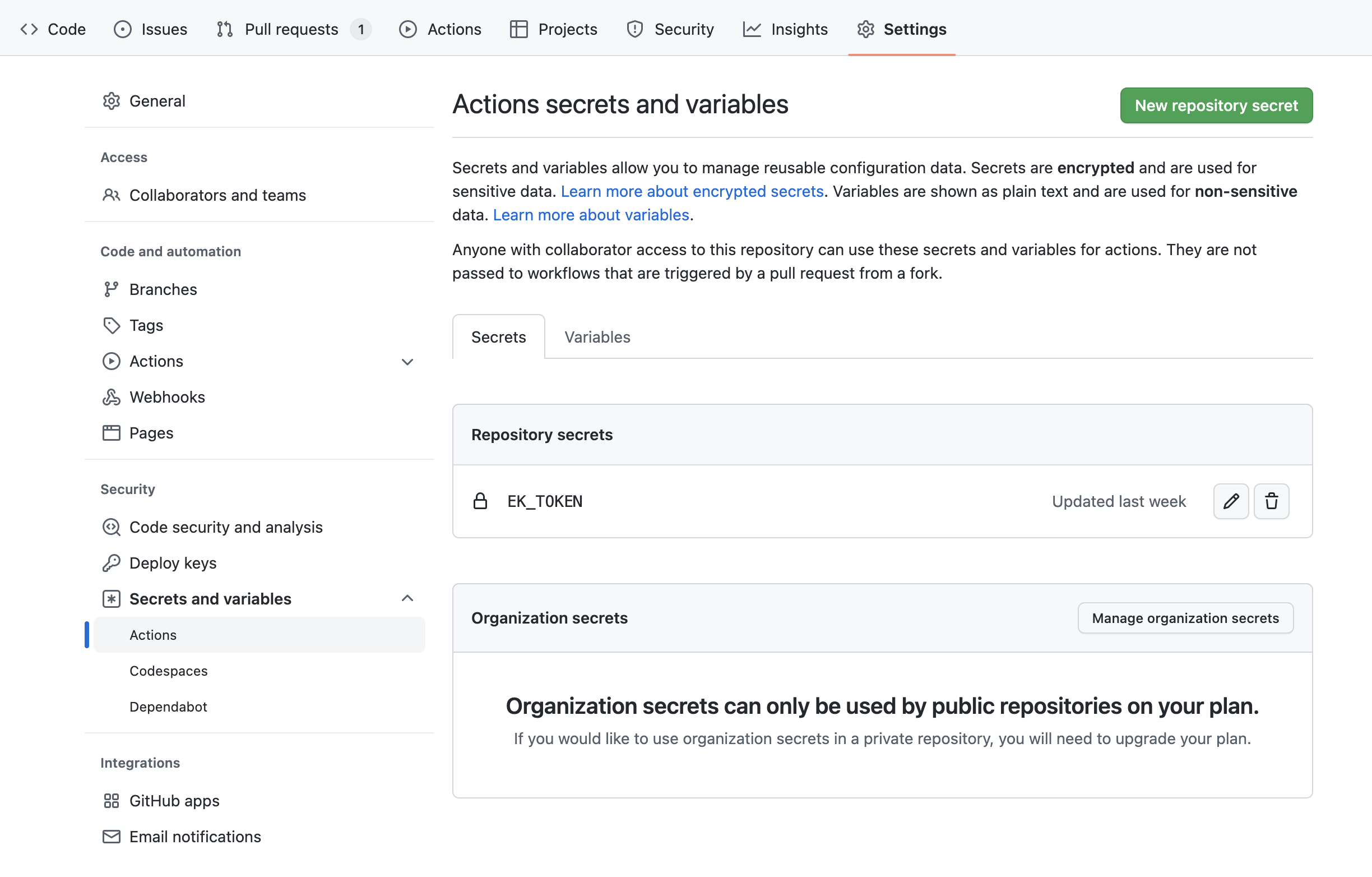
Grant write permissions to workflows
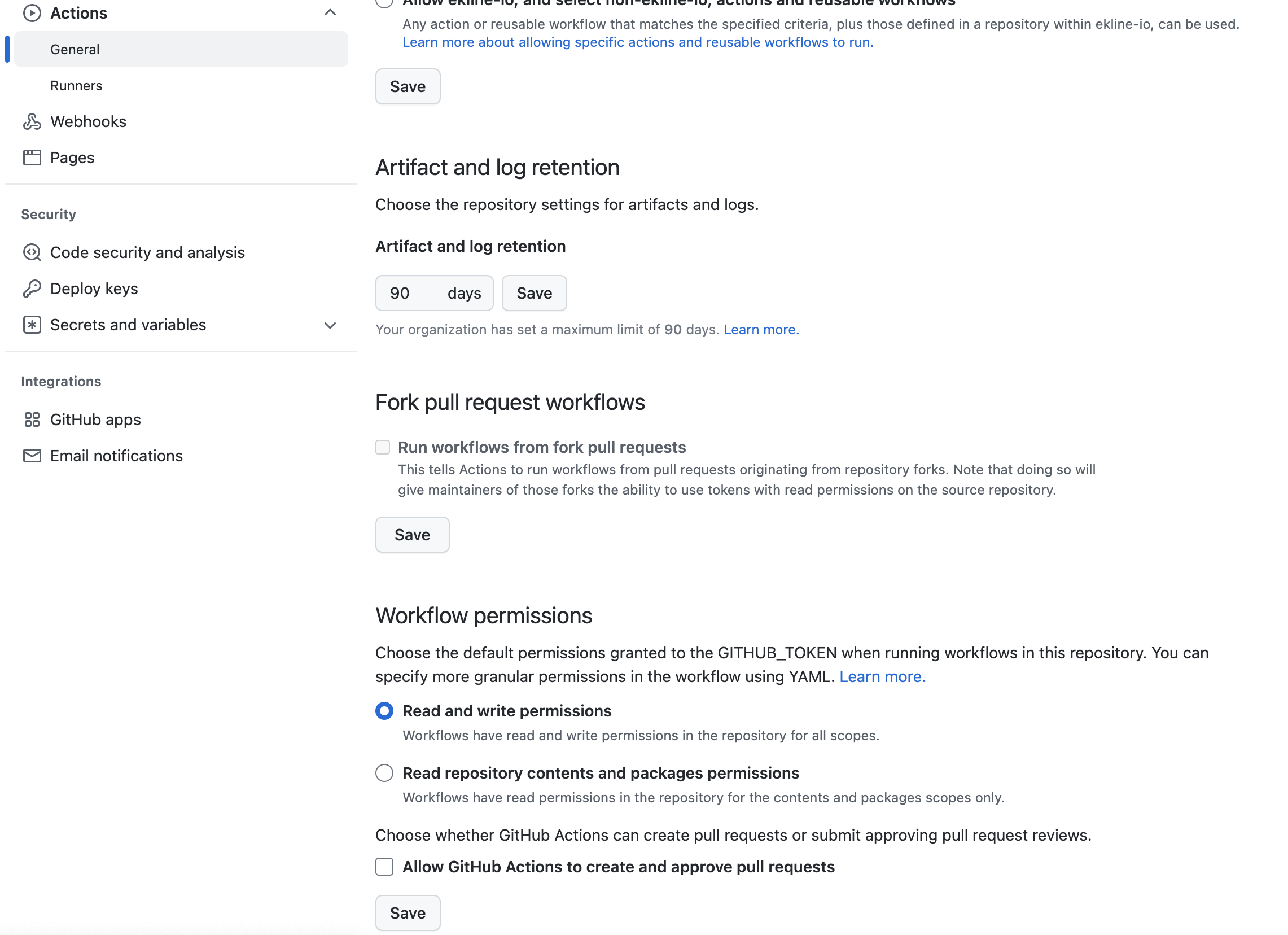
Section titled “Grant write permissions to workflows”To enable the EkLine GitHub Action to add comments to pull requests, you must grant write permissions to workflows. There are two ways to achieve this:
Option 1: Through repository settings
Section titled “Option 1: Through repository settings”- Navigate to Settings > Code and Automation > Actions > General > Workflow permissions.
- Click the drop-down menu and select Read and write permissions.
- Click Save to apply the changes.
Option 2: Through the workflow file
Section titled “Option 2: Through the workflow file”Add the following permissions block to your workflow file:
permissions: contents: read pull-requests: writeCheck the EkLine GitHub Action results
Section titled “Check the EkLine GitHub Action results”Once the EkLine GitHub Action runs, you can view the results in the “Actions” tab of your repository.
Your repository is now configured for automated documentation review with the EkLine GitHub Action.