

VS Code Setup
Get real-time feedback as you write. Takes about 3 minutes.
Real-time feedback as you write. Issues appear instantly. You don’t need to wait for CI.
-
Install the extension
Open VS Code and press
Cmd+Shift+X(Mac) orCtrl+Shift+X(Windows/Linux).Search for EkLine and click Install.
-
Enter your token
A prompt appears after installation. Paste your token from the EkLine Dashboard.
-
Open a doc file
Open any supported file. EkLine highlights issues automatically.
Supported file types: Markdown (
.md), MDX (.mdx), HTML (.html), reStructuredText (.rst), Plain text (.txt), AsciiDoc (.adoc)
That’s it
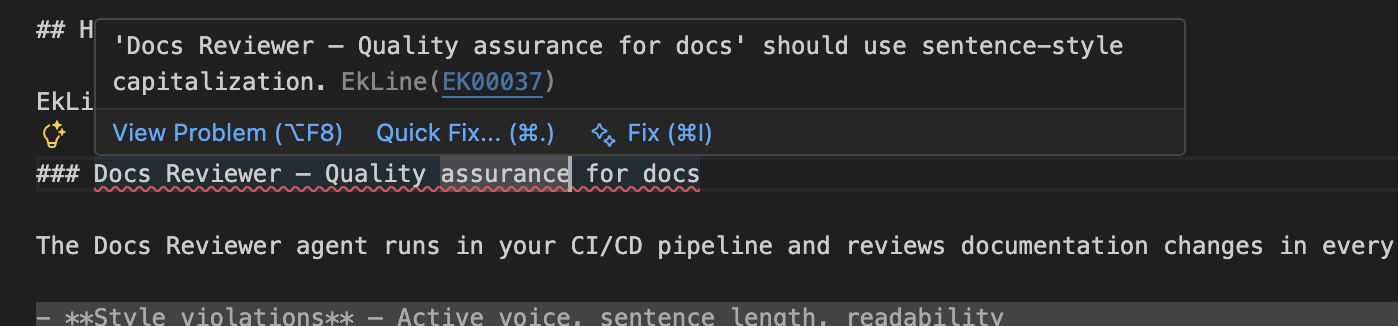
Section titled “That’s it”Issues appear as you type. Hover over highlights to see suggestions:
‘Docs Reviewer — Quality assurance for docs’ should use sentence-style capitalization. EkLine(EK00037)
Quick commands
Section titled “Quick commands”Press Cmd+Shift+P (Mac) or Ctrl+Shift+P (Windows/Linux):
| Command | What it does |
|---|---|
EkLine: Review current document | Check the open file |
EkLine: Review all documents | Check all docs in your workspace |
EkLine: Improve writing in current file | AI rewrites the current file |
AI assistant
Section titled “AI assistant”Select text and right-click to choose Improve with EkLine AI.
Keyboard shortcut: Cmd+Alt+E on Mac or Ctrl+Alt+E on Windows or Linux opens the AI assistant with your selection.
Stuck?
Section titled “Stuck?”Reply to your welcome email or contact support@ekline.io. We read every message.